
































The Art of Display: Lighting, Backdrops, and Layouts for Scale Models

The Art of Display: Lighting, Backdrops, and Layouts for Scale Models
Great models deserve a stage. Whether you're building a polished display for a cabinet at home, preparing a piece for a contest, or setting up a photo-ready diorama for social media, the way you light, backdrop, and arrange your models can transform how viewers perceive scale, detail, and storytelling. This guide breaks down practical, repeatable techniques for lighting, backdrops, and layouts that elevate scale models from•nice" to•immersive."
Lighting: The Invisible Artist
Light is not merely illumination; it's the brushstroke you use to sculpt form, set mood, and guide the eye. Good lighting can reveal texture, emphasize panel lines, and make weathering tell a story. It can also keep colors true and minimize unwanted reflections on glossy surfaces. The goal is to craft a lighting setup that feels natural, intentional, and repeatable.
Foundations of Effective Lighting
Consider these pillars when you design your lighting plan:
- Color temperature matters. Use daylight-balanced LEDs (~5500K-6500K) for most display purposes, or warm (2700K-3200K) for a nostalgic or vintage mood. If you're photographing as well as displaying, keep color temperature consistent across light sources to avoid color casts.
- CRI and flicker control. Choose LEDs with high CRI (color rendering index) to keep paint tones accurate. Look for flicker-free drivers if you'll be photographing or filming your display.
- Three-point lighting as a starting point. A classic approach uses a key light, a fill light, and a back/rim light to model the model's forms and separate it from the backdrop.
- Diffusion beats hardness. Diffuse light creates softer shadows, reduces edge harshness, and preserves delicate paintwork. Diffusion can be as simple as a white diffusion sheet, parchment paper, or a purpose-built softbox.
- Angle and distance. Light placed at a 15-20 degree angle above and about 45 degrees to the side is a reliable starting point for most scale models. Raise the light higher for a more overhead, softer look, or lower it for dramatic side lighting.
- Avoid glare and hotspots. Gloss finishes, clear canopies, or polished surfaces can reflect bright lights. Use diffusion, polarizing overlays, or reposition lights to minimize specular highlights that obscure detail.
Practical Lighting Setups
Here are three scalable setups you can adapt depending on space, budget, and model size. Each uses items commonly found in hobby spaces or budget studios.
Setup A - Core Three-Point Lighting for a Single Model
Purpose: a balanced, studio-like presentation suitable for dioramas or stand-alone figures and vehicles.
- Key light: A directional LED panel or clamp light with a diffuser, placed about 45 degrees to the front-right of the model, 15-20 degrees above eye level.
- Fill light: A second light at a lower intensity on the opposite side to soften shadows; also around 45 degrees from the model, at a similar height.
- Back light/rim light: A slim LED strip or small panel behind the model to create separation from the backdrop, about 1-2 feet away depending on model size.
- Background light (optional): A low-intensity light pointed at the backdrop to reduce shadows and create a clean, even gradient.
- Diffusion: Use a light-diffusing material in front of each light to soften shadows; aim for gentle transitions rather than hard lines.
Setup B - A Softer, Diorama-Ready Look
Purpose: ideal for wet-looking surfaces, weathered metals, and scenes that require more texture in highlights and shadows.
- Key light: Large softbox or DIY diffuser to create broad, even illumination from a high angle.
- Fill light: Subtly placed on the opposite side, lower intensity to preserve texture.
- Back light: A cooler light aimed from behind to separate model from backdrop and accentuate edges on weathered surfaces.
- Side accent lights: Narrow-beam LED spots to highlight seams, rivets, or chipping, placed close to the model but out of direct reflection paths.
Setup C - Small Space, Big Effect
Purpose: for shelf displays or cases with limited room, using a compact light tent or mini-softbox approach.
- Light tent or two compact panels: Place one on each side, angled slightly in toward the model, with diffusion panels to minimize harshness.
- Background lighting: A single low-powered strip behind the tent to create a clean separation against the backdrop.
- Height and tilt: Adjust so the tent forms a gentle, evenly lit space-model sits well within the glow, not at the edge of bright highlights.
Color, Texture, and Surface Considerations
Texture and color of the model interact with light. Glossy finishes reflect more, matte paints absorb more light, and metallics can bounce a surprising amount of specular highlight. A few tips:
- Test with a tiny swatch. Before committing to a specific diffusion setup, compare how a small sample area reads under each option. A quick test shot helps you avoid surprises on the display shelf.
- White balance matters. If you're displaying and photographing, use a consistent white balance in both activities to prevent color drift across your photos and real-life view.
- Temperature consistency across fixtures. Use same-type LEDs or tape a note on your rig to avoid mixed lighting with different color temperatures.
Backdrops: Setting the Scene
The backdrop does more than hide the wall or shelf edge; it frames the model, sets mood, and can tell a story without a single word. The right backdrop can lengthen the perceived scale, create depth, and give context to weathering and diorama elements.
Choosing the Right Backdrop
Backdrops come in many forms. Your choice should depend on the model, the story you want to tell, and the space where it's displayed.
A clean, uniform backdrop that stays consistent across photos. For scale modeling, light gray, mid-gray, or off-white tones work well because they reduce color cast and show detail nicely. Soft, non-reflective fabrics (velvet, muslin) provide a natural falloff and reduce glare from glossy surfaces. They're good for model trains, vehicles, and figures in natural settings. Subtle vertical or horizontal gradients add depth and can imply a horizon or distant landscape. Keep gradients gentle to avoid distracting from the model. Printed or painted panels with a scene (industrial, desert, maritime, urban) can ground the model in a context, enhancing storytelling. A backdrop with distant hills, water, or urban silhouettes can imply scale without cluttering the foreground.
Color Theory and Contrast
Backdrops should complement, not compete with, the model. Here are guidelines to harmonize color and value:
- Contrast balance. If your model is dark, a lighter backdrop helps it pop; if the model is light, a darker backdrop helps define the edges.
- Avoid busy patterns. Patterns at scale can confuse the eye and reduce perceived detail. If you want texture, opt for a subtle grain or watercolor wash rather than a repeating motif.
- Temperature consistency. A backdrop with a color temperature that clashes with your lighting will shift the perceived color of the model. If your lights lean warm, a cooler backdrop can balance the scene, and vice versa.
Depth and Space in Backdrops
Another way to elevate backdrops is by adding a sense of depth. Consider these approaches:
A shallow base or band of color in front of the backdrop can anchor the model and guide the eye toward the focal point. A gentle horizon cue near the top of the backdrop can imply distance, making the model feel part of a wider world. If your budget allows, create a small diorama base that sits in front of the backdrop. The eye perceives depth more convincingly when there are multiple planes between viewer and model.
Layouts: The Geometry of Presentation
Once lighting and backdrop are in place, the layout-the arrangement of the model, base, and any supporting elements-defines how viewers read the scene. A thoughtful layout guides the eye, communicates scale, and makes room for details to be discovered rather than overwhelmed.
Foundations of a Strong Display Layout
Keep these principles in mind when designing a display:
- Focal point first. Decide what you want viewers to notice first, whether it's a weathered cockpit, a chipped hull, or a diorama's central figure. Place the focal point at or near eye level and off-center following the rule of thirds for a natural composition.
- Layering and depth. Build the scene in layers: foreground elements (terrain, debris), the model itself, then a distant backdrop. Each layer should support the next and avoid crowding the field of view.
- Vertical rhythm. Use risers, stands, or different base heights to create a gentle vertical progression. This helps separate the model from the base and backdrop and makes the display more dynamic.
- Spacing and air. Allow negative space around the model. Crowded displays look busy and can obscure fine details. A little breathing room makes lines and angles easier to appreciate.
Base and Stand Design
The base and supports are more than supports; they're part of the narrative. Thoughtful base design adds realism and stability without distracting from the model.
Use clear acrylic risers for a clean, modern look, or wooden plinths with a matte finish for a more traditional display. Elevation changes help walk the viewer's eye through the scene. - Base textures. Texture adds realism-gravel, asphalt, desert sand, or water effects-depending on the model's setting. Keep textural elements subdued enough not to compete with the model.
- Reflective surfaces. A shallow, polished base or mirror can create interesting reflections, especially for aircraft or ships. Use sparingly and ensure the reflection does not overpower the model's features.
- Mounts and stability. Use non-damaging mounting methods. Consider foam dots, double-stick tape, or museum wax to secure components without leaving residue on paint.
Thematic Storytelling with Layouts
A display can tell a story beyond the model's own history. Consider mini-scenes or contextual elements that hint at the model's world:
Add era-appropriate tools, signage, or tiny weathered props to set a moment in time. - Environment hints. Small rocks, tufts of grass, and weathering debris can imply terrain-rocky deserts, muddy trenches, or urban rubble-without overpowering the main subject.
- Narrative arcs. A sequence of related models or a single model with a•storyboard" of surrounding elements can invite viewers to imagine outcomes or chapters in a larger scene.
Practical Steps: From Concept to Display
Whether you're preparing a solo display for a shelf or arranging a display for a show, a structured workflow helps you stay organized and consistent.
Step 1 - Define the focal point and story
Before you touch a light or backdrop, decide what you want the viewer to notice first and what story you want to convey. Write a short one-paragraph brief to guide decisions about color, texture, and arrangement. This keeps you aligned as you gather materials.
Step 2 - Plan the layout on paper
Sketch a simple layout or create a digital mock-up. Mark where the model will sit, where the backdrop ends, and how lighting will be placed. Consider the reach of your display in the space-will viewers walk around it or view it from a single angle?
Step 3 - Build the base and backdrop
Prepare the base first. Install any risers, textures, and backdrop supports. If you're using a painted backdrop, test lighting at this stage to see how the colors read under your intended lights. Make adjustments as needed before placing the model.
Step 4 - Set up lighting and test angles
Place lights according to your chosen setup. Start with the key light and adjust distance to manage shadow density. Introduce the fill and back lights, toggling between angles to find the most flattering shadows. Take test photos or videos to check how the model reads under different perspectives.
Step 5 - Place the model and supporting elements
Position the model in relation to the focal point. Add small diorama elements or weathering details in a way that guides the viewer's eye toward the subject. Ensure nothing blocks key features or reflections.
Step 6 - Final polish
Balance contrast, check color temperature consistency, and clean any fingerprints or dust. View the display from multiple angles and adjust as necessary. If you plan to photograph the display, capture from at least three angles and with a tripod for consistency.
Tools, Materials, and Budget Tips
Setting up a compelling display doesn't have to break the bank. Here's a practical toolkit and budgeting guidance to help you build a robust display system over time.
Core lighting tools
What to consider when picking lights:
- LED panels or bar lights with adjustable color temperature
- Clamp lights with diffusion for flexibility and budget-friendly options
- Light tents or softboxes for uniform, soft illumination
- Light stands or tripods and sturdy backdrop supports
- Diffusion materials, white foam boards, or diffusion fabrics
Backdrop and display bases
Backdrops and bases don't need to be elaborate to be effective:
- Seamless backdrops (paper or vinyl) in neutral tones
- Plain fabric backdrops for a natural look
- Printed or painted scene panels for diorama contexts
- Risers, plinths, and shallow display bases in wood, acrylic, or foam
Maintenance and care
Keep your display space organized and materials in good condition:
- Regularly dust models and backgrounds with a soft brush or microfiber
- Store backdrops rolled and clean to avoid creases and stains
- Label and wrap fragile items for transport to shows or clubs
- Use anti-static measures if you work with chalk powder or fine weathering powders
Common Pitfalls and How to Avoid Them
Every practitioner runs into challenges. Here are frequent issues and practical fixes to keep your display sharp and engaging.
If the backdrop appears tinted or colors look washed out, re-check color temperature consistency and diffusion. Dim lights with a larger diffusion area often read more naturally than bright, direct light. When elements crowd the focal point, scale and detail suffer. Remove unnecessary props or reduce their size to improve readability. Mismatched diorama objects can confuse viewers about the model's scale. Use scale-appropriate accessories and maintain a consistent visual language. If the front looks flat, bring in a side light or backlight to reveal panel lines, rivets, and other textures. Small changes in angle can dramatically improve depth. If you're photographing, ensure the camera is level with the focal point. Use a tripod and consistent framing to maintain quality across shots.
Case Studies: Real-World Applications
To illustrate how these concepts come together, here are a few condensed scenarios that model makers often encounter. Each scenario emphasizes a specific goal-clarity, mood, storytelling-and demonstrates how lighting, backdrops, and layouts can align to achieve it.
Case 1 - A Military Vehicle on a Desert Ration Base
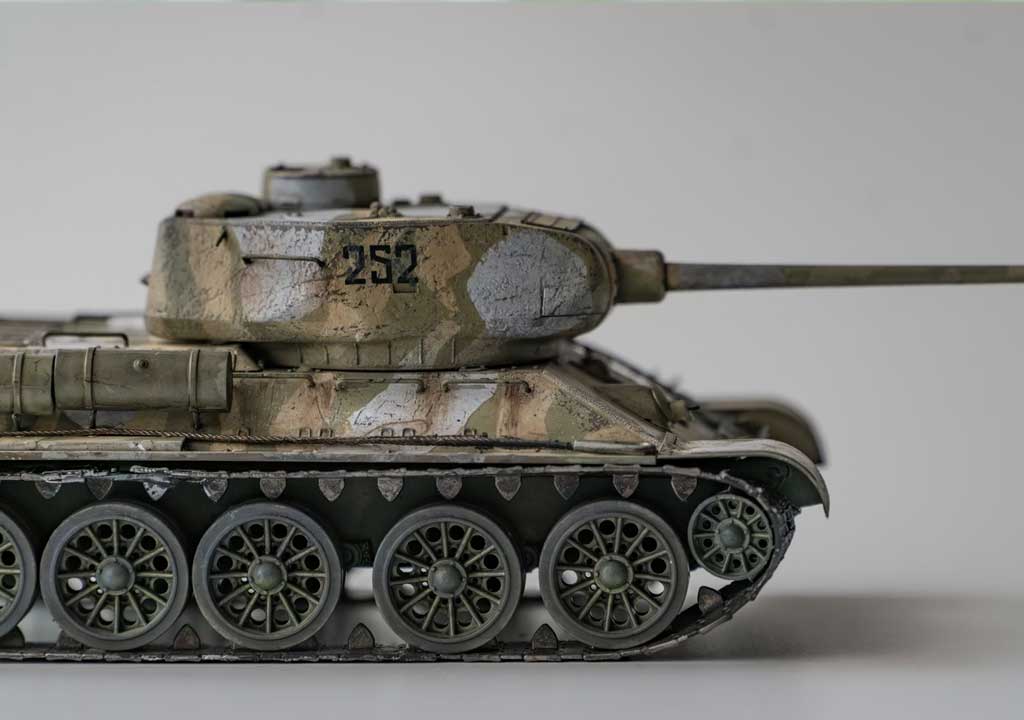
Goal: Convey harsh sunlight, dusty terrain, and rugged engineering. Lighting favors warm color temperatures with a high-contrast backdrop hinting at a distant horizon. A gravel-textured base with a low horizon line provides depth while a light gradient backdrop suggests open space.
- Key light: warm LED at a higher angle to simulate midday sun
- Fill light: gentle, slightly cooler to avoid washed-out shadows
- Backdrop: soft gradient transitioning from warm sand to pale blue sky
- Layout: model slightly off-center with a small pile of stowage gear in the foreground
Case 2 - A Sailboat in Misty Harbor Weather
Goal: Subtle, cool tones with a misty atmosphere. The backdrop uses a cool gradient or printed harbor silhouette with a soft, faint glow behind the model. Lighting emphasizes reflective water and de-emphasizes glare on varnished wood.
- Key light: cool white with diffusion for soft edge
- Back light: low, behind the model to create a halo on masts
- Backdrop: cool gradient with a distant harbor outline
- Base: shallow water effect with gentle ripples or a glassy surface
Case 3 - A WWII Fighter Aircraft on a Display Table
Goal: Crisp lines, dramatic shading, and a touch of weathering. The display uses a medium-gray backdrop with a light vignette to push the model forward and a base with runway textures.
- Key light: high-contrast, slightly from above to emphasize panel lines
- Fill light: low intensity to retain shadows that reveal form
- Back light: subtle rim to separate aircraft from the backdrop
- Layout: aircraft on a wooden stand with a small airstrip texture around the base
Photographing Your Display: A Quick Note
If part of your goal is to share your display online, consider the relationship between what you present in person and what shows up in photos. A few quick tips:
- Use a neutral white or gray backdrop for photography to reduce color shifts and help viewers compare models easily.
- Keep a stable, uniform light source to avoid flicker in video or long-exposure shots.
- Capture multiple angles to showcase details that might be missed in a single view.
- Calibrate white balance for your camera to match the display lighting for faithful color representation.
Conclusion: The Craft of Display as an Extension of Craftsmanship
Display is the stage on which your models perform. Lighting shapes mood and reveals detail; backdrops provide context and depth; layouts guide the eye and tell a story. By thinking through these elements in a structured, repeatable way, you can craft displays that are not only visually striking but also true to the scales and narratives you've spent so much craft and care building. The art of display is, at its heart, an invitation: invite the viewer to notice the fine lines in a repaint, to follow a scene around a diorama, to imagine the world surrounding the piece. When lighting, backdrop, and layout align with your modeling, you don't just present a model-you stage a moment of craft's ongoing conversation with the viewer.
If you'd like, tell me about a specific model you're displaying (scale, finish, backdrop ideas), and I can tailor a lighting, backdrop, and layout plan you can implement in your space with a practical bill of materials and steps.
LIKED THIS ARTICLE? SHARE IT: